piCAN-Logger · Data logger for CAN bus and EnergyBus

Record the CAN bus, even without a PC

The piCAN-Logger writes the traffic on a CAN bus to a microSD card on its own. Filters and triggers run in the device. The PC software sets the logger up, shows the bus live and turns a recording into files for Excel and other tools.

  • CAN 2.0A/B
  • EnergyBus
  • CANopen
  • DBC, EDS
  • USB
  • microSD

The IoT shop is available in German.

  • 1 CAN channel50 kbit/s to 1 Mbit/s, 11 and 29 bit
  • Microsecondstimestamp on every message
  • microSD4 GB as delivered, tested up to 32 GB
  • 12 V or USBpowered from the vehicle or a PC

Your benefits

Collect CAN data without carrying a PC

The logger sits on the bus, records and delivers recordings that can be evaluated without detours.

  • Measure without a PC

    After setup the logger works on its own, powered from the on-board supply. Filters and triggers are stored in the device and apply without a PC.

  • Only what matters on the card

    Hardware filters, the filter list and the transient recorder sort out data before it uses up storage, so the card lasts longer.

  • Verifiable completeness

    If the memory card briefly writes more slowly, the logger buffers the bus traffic. The system log shows whether a recording is complete.

  • Evaluation without detours

    On export the PC software converts the raw CAN data into physical values with units, such as °C, V or km/h. It works from a DBC file or your own signal definition. CAN Raw, CANopen and EnergyBus exports are also available. The CSV files open in Excel without an import dialog.

The device

Compact and rugged for installation in a vehicle

Aluminium housing with M12 circular connector and terminal block. The logger is powered with 12 V through the CAN connector or with 5 V over USB.

  • Aluminium housing, 73 × 28 × 100 mm
  • CAN connection isolated up to 3 kV
  • Operating temperature −20 °C to +60 °C
  • Real-time clock with backup battery
  • Multicolour status LED for ready, recording, USB transfer, full card and errors
Connector side of the piCAN-Logger: 6-pin terminal block labelled EnergyBus and M12 socket
Connector side with terminal block (EnergyBus) and M12 socket

Features

From the bus to the card and into the evaluation

Recording, filters and triggers in the device, live view and evaluation in the PC software.

Standalone recording

Every message with a timestamp in seconds and microseconds, CAN ID, length and data, protected by a checksum per record. The recording is split into several files automatically. Session name and comment later appear in the file name.

Hardware filters

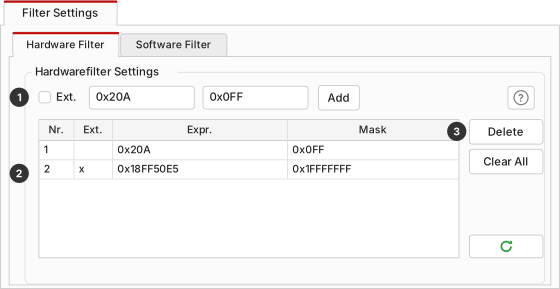
Up to 30 filters of ID and mask, for 11 and 29 bit. The CAN controller discards what is uninteresting before it costs storage.

Filter list

Up to 30 entries, checked from top to bottom. Each entry accepts or discards, by ID range or mask and optionally by data content. Frequently sent messages can be thinned out: every nth one, at most one per time span, or only on change.

Transient recorder

Up to 8 triggers compare CAN ID and data with a value (=, ≠, <, >, ≤, ≥) and start or stop the recording. The card mostly holds the sections in which something happens.

Live view over USB

The bus traffic appears in real time in the PC software. Your own messages can be sent once or cyclically. The logger registers as a virtual COM port, without a dedicated driver on Windows 10 and 11 and on Linux.

DBC, EDS and J1939

With a DBC or EDS file the software exports signals with name, unit and plain text from the value table. J1939 is recognised, and several files can be combined.

CANopen and EnergyBus

Recordings can be evaluated as CANopen and EnergyBus. With EDS or DCF files the software shows the contents of PDOs as signal values with units.

Sensor recording

Define your own sensor messages and channels with start bit, length, factor, offset and unit, follow them as a chart or table and save them as CSV.

Firmware update over USB

Updates come through the PC software. The bootloader starts the firmware only if its checksum is correct. If an update is interrupted, it can be repeated.

PC software

Set up, watch, evaluate

  • For Windows 10 and 11 and for Linux. On Windows, installation needs no administrator rights.
  • German and English interface, with a light and a dark colour scheme.
  • Bit rate, termination and silent mode, filters and triggers on their own tabs, with tooltips.
  • Fetch recordings directly over USB, with size and estimated duration shown, or read them in through a card reader.
  • Export as physical values: factor, offset and unit from a DBC file or your own definition turn the raw bytes into values such as temperature, voltage or speed, with state values as plain text if wanted.
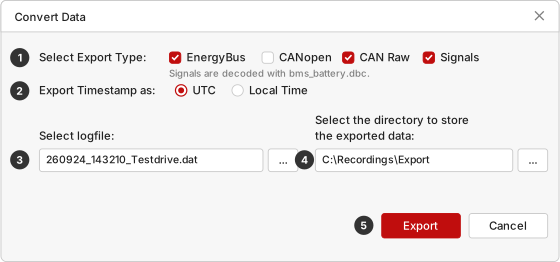
  • Also export as CAN Raw, CANopen and EnergyBus, several formats in one pass. Timestamps in UTC or local time.
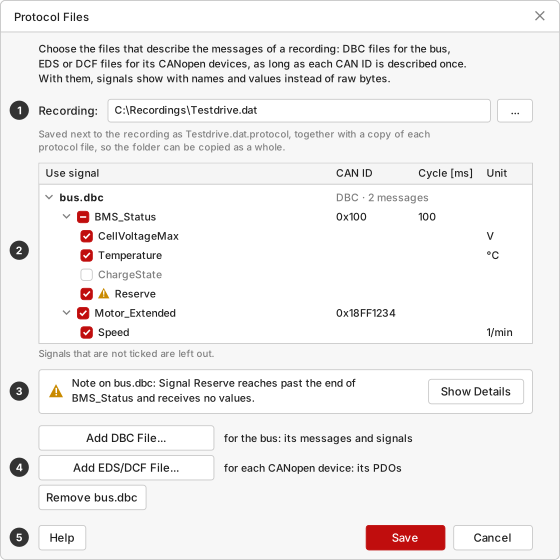
  • The signal mapping is saved with a copy of the protocol files next to the recording. The folder can be passed on complete.
  • Memory card fill level in the main window.
  • Built-in, searchable manual with a sketch of every window.
Sketch: live view with received CAN messages and send list
Live view
Sketch: protocol files with signal selection
Protocol files and signal selection

Getting started

Ready in four steps

  1. Connect

    CAN bus and supply to the terminals or the M12 socket, or run the logger from a PC over USB.

  2. Set up

    In the PC software choose bit rate, termination and silent mode, define filters and triggers and give the recording a name.

  3. Record

    The logger stores every message and spreads the recording over several files. For the live view it is connected to the PC over USB.

  4. Evaluate

    Read the recording in over USB or a card reader and convert it into physical values, or output it as CAN Raw, CANopen and EnergyBus.

Sketch: hardware filter tab in the PC software
Setting up hardware filters (sketch from the software manual)
Sketch: data conversion window with export format selection
Converting a recording (sketch from the software manual)

From raw value to measured value

Animation: the card holds message 0x3A0 with the bytes B4 41. The protocol file says byte 0 is the state of charge with factor 0.5 in percent and byte 1 the temperature with offset −40 in °C. The data conversion computes 0xB4 = 180 × 0.5 = 90 % and 0x41 = 65 − 40 = 25 °C and writes both with units to the CSV file for Excel. Example values, about 25 seconds.

Applications

For measurements in the vehicle and at the plant

The logger is meant for measurements where a CAN bus is recorded over a longer period and no PC is present. Over USB the bus can also be watched live.

  • Vehicle testing

    The logger takes 12 V through the CAN connector and records in the vehicle without a PC. Session name and comment later appear in the file name, for example vehicle, date and purpose of the drive.

  • Test benches and plants

    Over USB the PC software shows the bus traffic in real time. You can send your own messages once or cyclically and follow sensor values as a chart or table.

  • CAN-USB interface

    On a PC the logger also works as a CAN interface. On Linux, pican-bridge sets it up as a SocketCAN device. For your own applications on Windows and Linux there is the libpicanlogger library. Both are part of the downloads for the device, you use what you need.

  • Sporadic faults in the field

    With the transient recorder, recording starts and stops depending on the bus traffic, so the card does not fill up with hours of uneventful traffic.

  • EnergyBus and CANopen

    The CAN connector is EnergyBus-capable. Recordings can be evaluated as CANopen and EnergyBus, with EDS and DCF files down to the signal values of the PDOs.

Test results

Tested on a fully loaded bus

The logger was tested for many hours on a bus where messages follow one another without a pause, at 125 kbit/s to 1 Mbit/s and with many millions of messages. Every message on the bus was compared with the contents of the card.

  • Sustained load: around 4,000 messages per second at 500 kbit/s, for hours.
  • File changes: recording continues across new files without a gap.
  • Live view: all messages arrived, none duplicated, in the right order.
  • Readout: even cards with several hundred files, complete and with valid checksums.
  • Queries during recording: status and system log can be read without interrupting the recording.

Measured with the card supplied (4 GB, class 10).

Data sheet

Specifications

Developed by pironex in Germany. We are happy to answer questions about your application.

piCAN-Logger specifications
CAN1 channel, CAN 2.0A/B (11- and 29-bit identifiers); isolated up to 3 kV; EnergyBus-capable
Bit rates50, 100, 125, 250, 500, 1000 kbit/s
Termination120 Ω, switchable
Operating modesRecording to microSD, live over USB, silent mode
StoragemicroSD card, 4 GB class 10 as delivered, larger cards also work, tested up to 32 GBCards the logger cannot read, for example ones formatted with exFAT at the factory, are reformatted at start-up or when inserted. Any data on them is lost.
Sustained loadaround 4,000 messages/s at 500 kbit/s, tested in a sustained test over several hours
TimestampsSeconds and microseconds; real-time clock with backup battery
Filtersup to 30 hardware filters (ID/mask, 11 or 29 bit); filter list with up to 30 entries (accept/discard, ID range or mask, data mask, thinning)
Transient recorderup to 8 triggers on CAN ID and data (=, ≠, <, >, ≤, ≥), start and stop
PC interfaceUSB type B (device), virtual COM port, no dedicated driver needed
CAN-USB bridgeLinux: SocketCAN device via pican-bridge (receive and send); Windows and Linux: libpicanlogger library
Connectors6-pin terminal block (EnergyBus), M12 socket 5-pin A-coded, USB type B
Power supply5 V DC over USB or 12 V DC through the CAN connector (VAUX, EnergyBus)
Temperature range−20 °C to +60 °C
HousingAluminium; 73 × 28 × 100 mm (W × H × D) without seals and connectors; length with end caps 107.2 mm, with connectors 118.4 mm
IndicatorRGB LED for status display
PC softwareWindows 10/11 and Linux; German and English
Export formatsCAN Raw, CANopen, EnergyBus; signals (DBC/EDS)

Subject to technical changes.

Dimension drawing: width 73 mm, height 28 mm, length 107.20 / 115.60 / 118.37 mm
Dimension drawing (mm)

Pin assignment

6-pin terminal block
PinSignal
1CAN High
2CAN Low
3Power GND
4Power 12 V
5CAN Low
6CAN High
M12 socket, 5-pin, A-coded
PinSignal
1Shield
2Power 12 V
3Power GND
4CAN High
5CAN Low
Pin layout of the M12 female socket, 5-pin, A-coded, pins 1 to 5

All A-coded M12 connectors fit as the mating part.

Questions about the piCAN-Logger?

Tell us briefly which bus you want to record and where the logger will be used. We are happy to answer your questions.